 signs of phishing

We’ve written time and again about phishing schemes where attackers exploit various legitimate servers to deliver emails. If they manage to hijack someone’s SharePoint server, they’ll use that; if not, they’ll settle for sending notifications through a free service like GetShared. However, Google’s vast ecosystem of services holds a special place in the hearts of scammers, and this time Google Tasks is the star of the show. As per usual, the main goal of this trick is to bypass email filters by piggybacking the rock-solid reputation of the middleman being exploited.
What phishing via Google Tasks looks like
The recipient gets a legitimate notification from an @google.com address with the message: “You have a new task”. Essentially, the attackers are trying to give the victim the impression that the company has started using Google’s task tracker, and as a result they need to immediately follow a link to fill out an employee verification form.
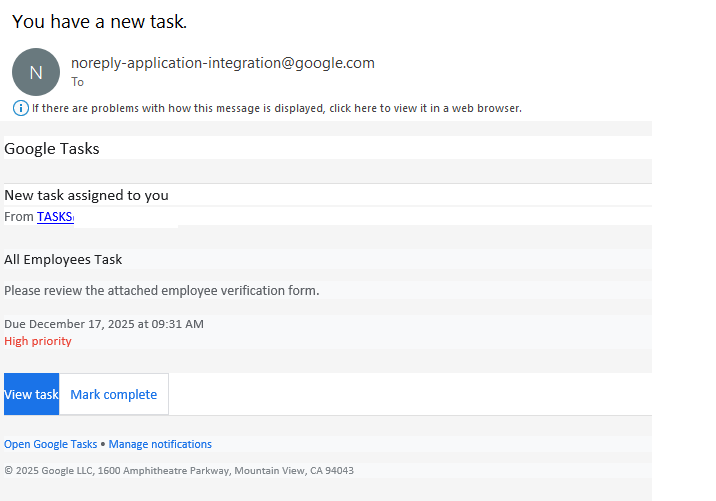
To deprive the recipient of any time to actually think about whether this is necessary, the task usually includes a tight deadline and is marked with high priority. Upon clicking the link within the task, the victim is presented with an URL leading to a form where they must enter their corporate credentials to “confirm their employee status”. These credentials, of course, are the ultimate goal of the phishing attack.
How to protect employee credentials from phishing
Of course, employees should be warned about the existence of this scheme — for instance, by sharing a link to our collection of posts on the red flags of phishing. But in reality, the issue isn’t with any one specific service — it’s about the overall cybersecurity culture within a company. Workflow processes need to be clearly defined so that every employee understands which tools the company actually uses and which it doesn’t. It might make sense to maintain a public corporate document listing authorized services and the people or departments responsible for them. This gives employees a way to verify if that invitation, task, or notification is the real deal. Additionally, it never hurts to remind everyone that corporate credentials should only be entered on internal corporate resources. To automate the training process and keep your team up to speed on modern cyberthreats, you can use a dedicated tool like the Kaspersky Automated Security Awareness Platform.
Beyond that, as usual, we recommend minimizing the number of potentially dangerous emails hitting employee inboxes by using a specialized mail gateway security solution. It’s also vital to equip all web-connected workstations with security software. Even if an attacker manages to trick an employee, the security product will block the attempt to visit the phishing site — preventing corporate credentials from leaking in the first place.

 Tips
Tips