While many people are still making the most of the international summer season and exploring new destinations through guides such as the Kaspersky Safe Travel Insights, businesses are preparing for the return to a more active working rhythm. Cybercriminals may take advantage of this increased digital activity by disguising malicious files and links as legitimate workplace communications. Kaspersky’s analysis of the past 12-months shows how attackers continue to exploit trusted business tools: specifically, Kaspersky detected 4.7 million attempted attacks involving content mimicking popular workplace services, including Zoom, Outlook, OneDrive and others*.
After the international summer period, employees often return to a more active working rhythm: projects resume, teams reconnect, and the number of emails, meetings and shared files increases. This transition creates conditions that cybercriminals can exploit. A fake video-call invitation may appear among legitimate meetings, a malicious attachment may be disguised as a business document, and a phishing page may imitate a familiar cloud storage or email service. When employees are processing a high volume of routine communications, a fraudulent message may be more difficult to distinguish from a genuine one.
From July 2025 to June 2026, Kaspersky detected 4,781,846 attempted attacks involving content associated with widely used workplace platforms. Zoom was the most frequently abused name, accounting for 2,658,283 attempted attacks. Outlook ranked second with 1,546,122 detections. Cybercriminals also used content associated with OneDrive, which accounted for 197,030 attempted attacks, Microsoft Excel with 151,948 and Microsoft Teams with 111,402.
The largest threat category detected during the period was Downloader, with 2,733,204 cases. Such programs may download and install additional software on a device, potentially introducing further unwanted or malicious components.
Trojans were the second-largest category, accounting for 989,377 detections. These malicious programs disguise themselves as legitimate files or applications and may steal data, monitor user activity, provide attackers with remote access to a device or install additional malware. Exploits, which may take advantage of vulnerabilities in software or operating systems to compromise a device, followed with 341,165 cases.
Phishing schemes target corporate accounts through familiar work scenarios
Many of the phishing schemes identified by Kaspersky were designed to compromise corporate accounts. Some of the schemes used a more sophisticated device code phishing technique. Instead of asking the victim to enter a password directly on a fake login page, the phishing site displayed a one-time code and instructed the user to copy it. The code was generated as part of Microsoft’s legitimate Device Authorisation Grant flow, which allows users to authenticate on devices with limited input capabilities. The attackers initiated this authorisation process for their own application and tricked the victim into entering the code on a genuine Microsoft login page.
By completing the authentication
process — potentially including multi-factor authentication — the user could
unknowingly authorise an application controlled by the attackers. Unlike
traditional phishing, the victim’s Microsoft credentials are not directly
exposed; instead, attackers obtain access through an authorisation token issued
by Microsoft after the user approves the request. This can allow them to access
emails, OneDrive files or Teams messages. The use of an official Microsoft page
makes this attack particularly deceptive, as checking the domain alone may not
reveal the threat.
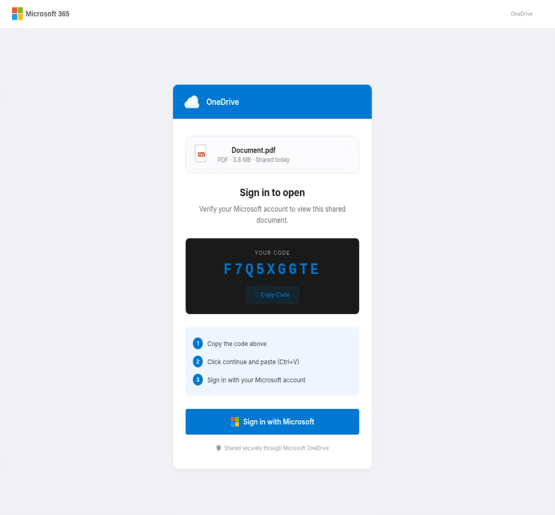 Example of
a phishing page asking to enter the code
Example of
a phishing page asking to enter the code
The other corporate-related threats tracked by Kaspersky experts also included fake interview invitations impersonating Google’s recruitment team. The messages claimed that the recipient’s professional background had attracted the company’s attention and invited them to schedule an introductory call through an embedded link. Notably, these phishing emails were distributed via Google AppSheet, a legitimate Google-owned platform, and were sent from a genuine AppSheet address. Attackers abused the service to deliver fraudulent content while making the messages appear more trustworthy. The embedded link, however, redirected recipients to a phishing website designed to collect personal information and account credentials.
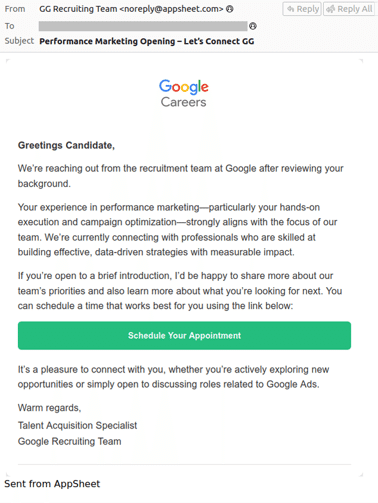
Example of a fake invitation to the interview
This type of lure may be especially convincing at the start of the new business season, when companies resume recruitment activity and professionals are more likely to receive messages from recruiters. The use of a legitimate service such as AppSheet adds another layer of credibility to the scheme, while the personalised career opportunity is designed to spark curiosity and encourage recipients to follow the link before verifying the vacancy through the company’s official careers website.
“After the international summer period employees will receive meeting invitations, documents, account notifications and requests from both familiar and new contacts. Cybercriminals understand this context and may imitate exactly the tools people expect to encounter during the working day. The danger is not necessarily an obviously suspicious message, but one that looks ordinary enough to be opened without a second thought,” comments Evgeny Kuskov, Lead Security Researcher at Kaspersky.
To reduce the risks associated with attacks disguised as workplace tools, Kaspersky recommends that employees:
- Check the sender’s address and the destination of links before opening meeting invitations, shared documents or account notifications. Small changes in a domain name may indicate impersonation.
- Download work applications or updates only from official websites, trusted app stores or company-approved software systems.
- Be cautious when a document unexpectedly asks users to enable macros, disable security settings or install additional software.
- Use strong, unique passwords for corporate accounts and store them securely in a password manager.
- Enable multi-factor authentication for email, cloud storage, collaboration platforms and other business-critical services.
- Verify unusual payment requests, document-sharing invitations or access requests through a separate communication channel, especially when they appear urgent.
- Provide employees with regular cybersecurity awareness training that includes realistic examples of phishing, fake login pages and malicious workplace notifications.
- Use a reliable security solution such as Kaspersky Next and Kaspersky Premium on both corporate and personal devices used for work to detect malicious files, phishing pages and suspicious activity.
* The keywords analysed included Zoom, Outlook, OneDrive, Microsoft Excel, Microsoft Teams, Gmail, Dropbox, Figma, Google Drive, Basecamp and Slack.


